MINUTE-LEVEL ENTRIES
Log minutes, not just hours.
An hour is a good default, not a rule. When one line will not cover sixty minutes, split it: 12:00 to 12:15, 12:15 to 12:30, or whatever the hour actually did. Overlaps are blocked, so the day still adds up.

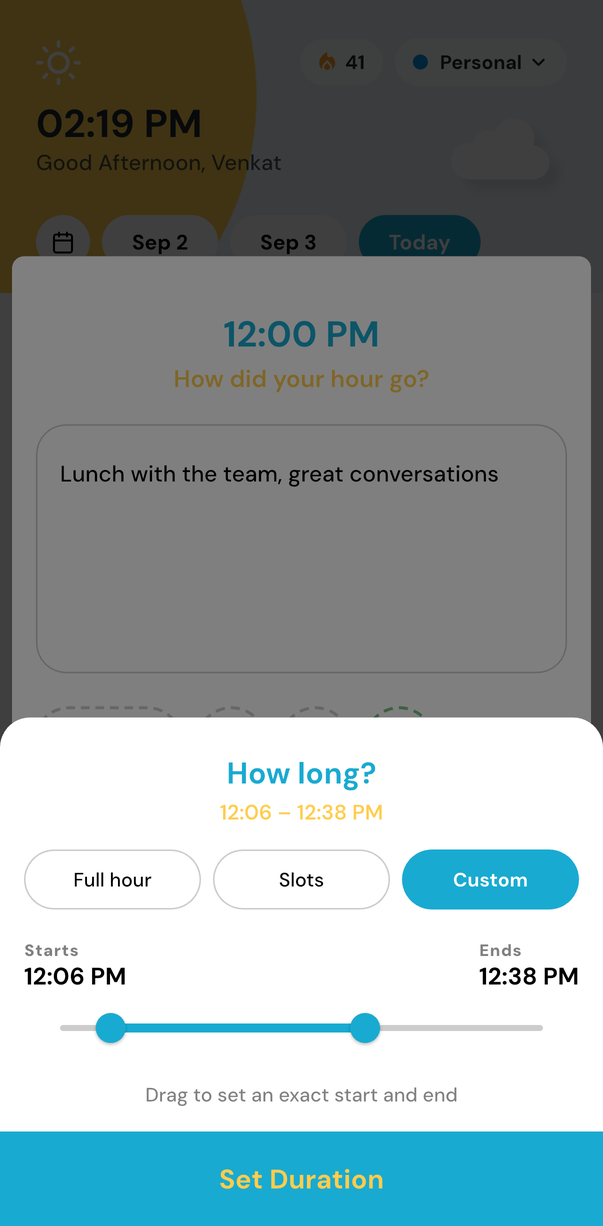
Fifteen-minute slots free, custom minutes with Premium
Four slots in every hour
The :00, :15, :30 and :45 marks are there for everyone, with no upgrade and no setting to hunt for.
Any start and end, with Premium
Custom minutes let an entry run 12:06 to 12:38 when the neat quarters do not describe it.
No double-counted time
Overlapping entries are blocked, so the totals in Insights and Deep Report stay honest.
Alongside the rest of the day
Sub-hour entries sit in the same list as whole hours and multi-hour stretches. Use whichever fits the hour.
How to log part of an hour
- 1
Tap the hour you want to record.
- 2
Under How long, choose :00, :15, :30 or :45 — or Custom with Premium.
- 3
Add the note, the tags and the reaction, and with Premium the energy it took.
A journal shaped like your day
Some hours are one thing from start to finish. Others turn over three times. Minute-level entries let both be true, without asking you to write more than the hour deserves.
Start with the next hour
One small check-in each hour puts your whole life in perspective
Free to start. Try it on iOS, Android, or the web.