HOURLY JOURNAL FOR REMOTE WORKERS
Give your remote workday a clearer shape
Without a commute, work can start quietly and spill into the evening. Hourly Journal helps you name the hours — deep work, meetings, breaks and home life — so you have a personal record of how the day actually unfolded.
Free to start on iOS, Android and the web. Journaling, tags, moods and insights stay free forever.
Keep the workday from blurring into everything else
Work reaches dinner because nothing marks the end of it.
No commute, no change of clothes, no walk to a door. Just Slack, still open, at ten past seven, on a laptop three metres from the table.
You can't say what happened between the meetings.
Your calendar has the meetings. It has nothing at all to say about the two hours between them — whether they were deep work, admin, or a slow scroll.
By Wednesday the weekdays have started overlapping.
Same desk, same chair, same four walls. Without anything marking the hours apart, Tuesday and Thursday genuinely do become hard to tell apart.
HOW THE HOURS GET LOGGED
One week at the kitchen-table desk
- 1
Tag Home Life the moment work actually stopped
Not when you meant to stop — when the laptop actually shut. The distance between those two times is usually the most useful thing you log all week.
- 2
Log Break honestly, including the ones you skipped
If lunch was a sandwich eaten over email, that hour is Meetings or Deep Work, not Break. The log is only worth reading if it matches what happened.
- 3
See which hours Deep Work actually fell in
The per-tag timeline shows the hours your Deep Work entries landed in. For some people that's a narrow window; for others it's scattered. Yours is whatever your week says it is.
- 4
Log an at-home week and an in-office week the same way
If you split your time, tag both weeks identically and read the two sets of totals next to each other. It's a comparison, not a recommendation.
SUGGESTED TAGS
Tags for a day with no commute in it
Four work tags and one for everything after. The interesting one is Break, because it's the tag people discover they never use.
A DAY IN THE LIFE
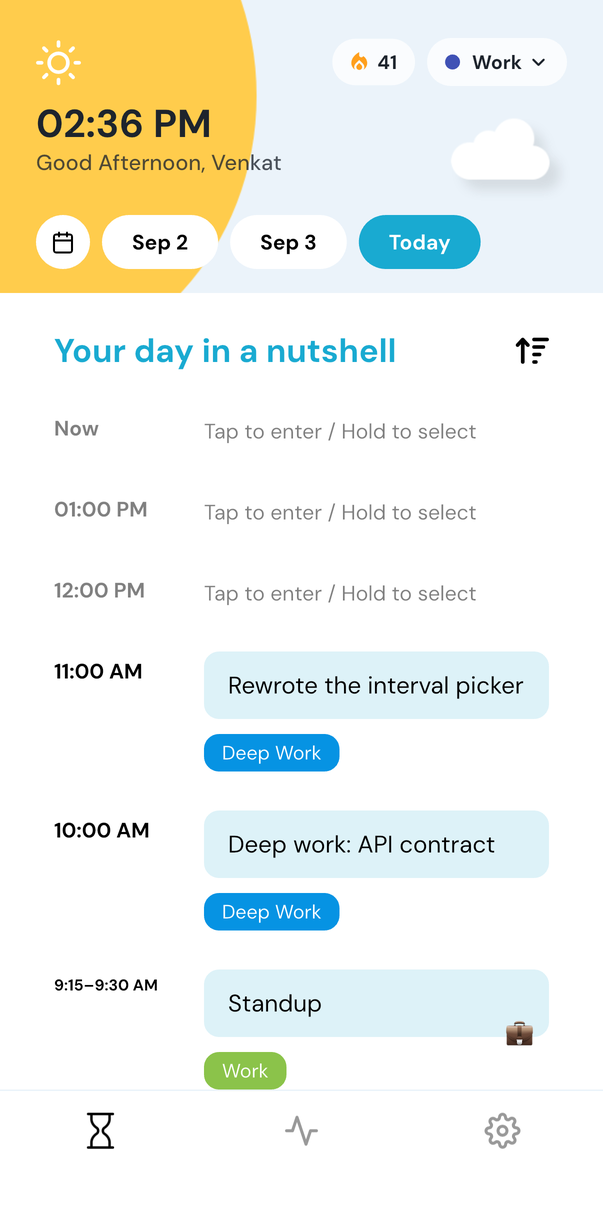
A day at home, 8 AM to laptop-closed
The 7 PM entry is the one worth having. Without it, “when did I stop?” is a guess you make on Friday about Tuesday.
HOW IT WORKS
The parts of the app that follow you to the desk
- Journal from the browser you already have openapp.hourlyjournal.com is the same journal on your laptop — no install, keyboard-friendly, in sync with your phone.
- Set the hours the nudge runs betweenA wake time, a sleep time and an interval, so the question stops arriving once your working day has.
- Give work its own workspace, separate from homeA Work workspace is a Pro feature that keeps deep-work and meeting hours apart from personal entries, with its own colour and reminder schedule — lock it if you share the laptop.
The core journal is free forever on iOS, Android and the web. See what Premium adds.
Questions from people whose desk is at home
Do I have to log every hour I'm at my desk?
No. Log the hours you want a record of and skip the rest — plenty of people tag only the work hours plus the handover into the evening.
Is this something my manager sees?
No. It's a personal journal, not a status tool, and nothing is shared with anyone. What you get is your own record of how the day split, which is yours to use or not in a 1:1.
Does it work across time zones and devices?
Yes. Reminders follow your own wake-to-sleep window wherever you are, and entries sync between the app and the web. If an hour is edited on two devices, both versions are kept.
Use it wherever you work
At your desk, on your phone, or in the web app. Write as much or as little as you want — the next hour is enough to begin.
Keep exploring